This post is for mommy, tide shell prompt and fish shell
I won’t waste your time, it took longer than I expected — last 40 mins were spent on figuring this out, kinda embarassing for me, but I will just go over which config files you need to change so you don’t end up wasting time like me.
I did this for a two line tide setup, just find the appropiate line for the single line tide fish prompt, just search for right and append the some test string like “aaaa” and see if it shows up, if it does, you have found the place where you need to add it.
in my case it was this place in ~/.config/fish/functions/fish_prompt.fish
| |
after we have saved the value to a variable of the last command run, send it to mommy :
| |
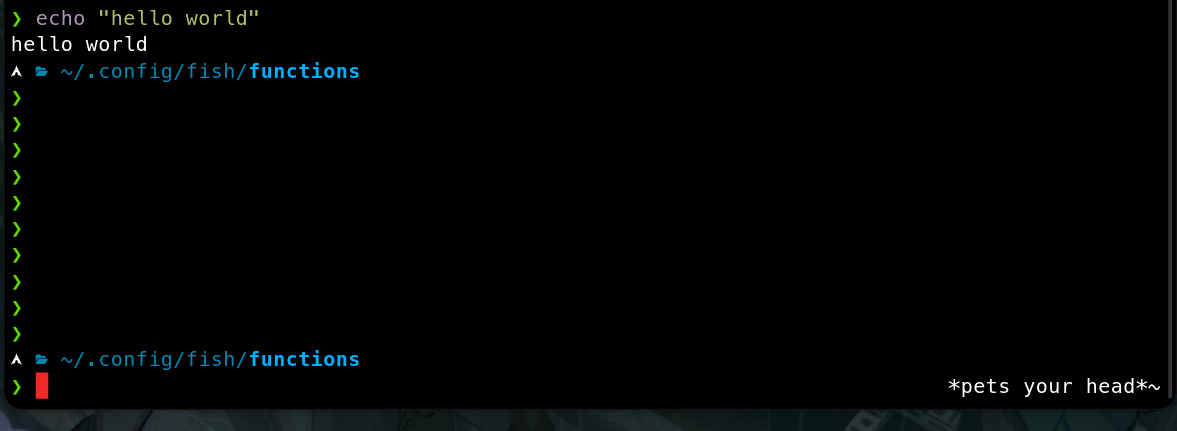
Notice how I added the mommy command after the right frame. We use $ to escape the eval
first otherwise you will keep getting cached stuff, and then you use -1 to redirect stuff
to stderr instead of stdout and finally you pass the status so mommy knows what you’re
doing. I am not sure why we need _tide_last_status variable seprately but for some
reason if you call $status variable directly from there, it will always echo 4, so you
need to save it to variable before you pass it off to mommy.
Cool extras
You can also pipe it to have rainbow color, which needs lolcat(6) installed on your computer,
by default the config file lives at ~/.config/mommy/config.sh, show just open it using
your fav text editor and create it, if it doesn’t exist.
| |
this works well and makes mommy’s output in ✨r g b✨, you should be happy enough rn if you have a fast enough computer but i don’t. the prompt started feeling really slow with this ruby bloat stuff, i mean mommy is aldready slow, but adding rubyslop to it, just meh… I found a faster C alternative if you want : github.com/jaseg/lolcat. Compile this and copy it to /usr/bin, works very well.
